Blocking vs non-blocking — the #1 beginner bug
Blocking (=) executes immediately — the next line sees the new value.
Non-blocking (<=) schedules updates for the end of the time step — all RHS values
are sampled first. Mix them in a clocked block and you get races, broken swaps, and silicon that doesn't match simulation.
Combinational always @(*) → use =. Clocked always @(posedge clk) → use <=. No exceptions in synthesizable RTL.
How the simulator executes them
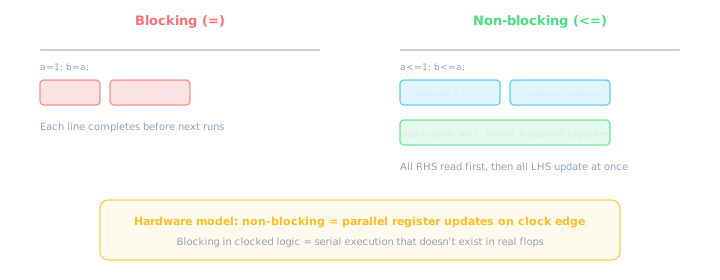
Blocking is sequential within the time step. Non-blocking samples all inputs, then commits all outputs.
| Operator | Name | When RHS is read | When LHS updates | Use in |
|---|---|---|---|---|
= | Blocking | Immediately before each line | Immediately — next line sees it | always @(*) |
<= | Non-blocking | Start of time step (all at once) | End of NBA region (all at once) | always @(posedge clk) |
Non-blocking is a group photo — everyone poses (sample) at the same moment, then the shutter fires (update) once. Blocking is a relay race — each runner must finish before the next starts. Flops update in parallel, not in sequence.
LAB: Swap two registers — wrong vs right
Goal: exchange values of a and b on each clock edge. This is the classic interview/debug lab.
// WRONG — blocking in clocked always
reg [7:0] a, b;
always @(posedge clk) begin
  a = b;   // a gets b's value immediately
  b = a;   // b gets a's NEW value (= b) — no swap!
end
// Result: both become the old b. a is lost.
// CORRECT — non-blocking samples old values first
reg [7:0] a, b;
always @(posedge clk) begin
  a <= b;   // schedule: a <- old_b
  b <= a;   // schedule: b <- old_a
end
// At NBA: a=old_b, b=old_a — true swap!
Swap lab waveforms (a starts 0xAA, b starts 0x55)
Using a temp variable with blocking can work in sim but is not the idiomatic pattern and may confuse synthesis. Stick to <= for all clocked register updates.
LAB: Pipeline shift register
A 3-stage pipeline shifts data through registers each clock. Non-blocking naturally models parallel flop updates.
module pipeline_shift (
  input  wire        clk,
  input  wire        rst_n,
  input  wire [7:0]  din,
  output wire [7:0]  dout
);
  reg [7:0] stage1, stage2, stage3;

  always @(posedge clk or negedge rst_n) begin
    if (!rst_n) begin
      stage1 <= 8'd0;
      stage2 <= 8'd0;
      stage3 <= 8'd0;
    end else begin
      stage1 <= din;      // new data enters
      stage2 <= stage1;   // all RHS are OLD values
      stage3 <= stage2;
    end
  end

  assign dout = stage3;
endmodule
// WRONG — blocking collapses pipeline in one cycle!
always @(posedge clk) begin
  stage1 = din;
  stage2 = stage1;  // stage1 already updated!
  stage3 = stage2;  // all get din in ONE cycle
end
// Hardware: 1 register. Simulation: matches (but wrong intent).
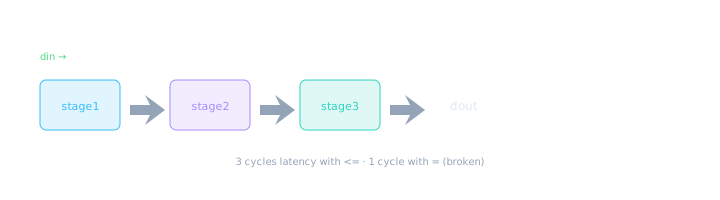
Non-blocking preserves one-cycle-per-stage behavior. Blocking bypasses intermediate stages.
Pipeline waves (din = 0x01, 0x02, 0x03). CORRECT lags 3 cycles. WRONG reaches dout same cycle.
Race condition example
When blocking assignments create dependencies within a clocked block, simulation order determines results — but hardware has no such order.
reg [3:0] count;
always @(posedge clk) begin
  count = count + 1;   // blocking: reads NEW or OLD count?
                       // Answer: reads value AFTER previous
                       // line in SAME block — but there's only one line
                       // so it reads pre-update count... usually.
                       // Add another line and it breaks:
  if (count == 4'd5)
    count = 4'd0;      // order matters! race with line above
end

// SAFE version:
always @(posedge clk) begin
  if (count == 4'd5)
    count <= 4'd0;
  else
    count <= count + 1;
end
Why it matters: Synthesis tools may reorder or optimize logic differently than your simulation execution order. Non-blocking eliminates this class of bugs by design.
Complete rules table
| Context | Operator | Reason |
|---|---|---|
always @(*) combinational | = | Outputs must reflect inputs immediately; no clock edge |
always @(posedge clk) sequential | <= | Models parallel flop updates on clock edge |
Testbench initial blocks | = | Procedural stimulus — no hardware mapping |
| Multiple reg updates same cycle | <= | All see old values — swap, pipeline, FSM |
| Single temp in combo always | = | Intermediate values within combo block |
assign statements | N/A (no = or <=) | Continuous drive — always "parallel" |
Do
Use <= for every assignment in clocked always. Use = for every assignment in combo always. Be consistent — no mixing in one block.
Don't
Don't use = in always @(posedge clk). Don't use <= in always @(*) (works in sim, wrong style, confuses tools).
LAB: Full testbench to verify
module swap_tb;
  reg        clk, rst_n;
  reg  [7:0] a, b;
  wire [7:0] a_out, b_out;

  // Instantiate CORRECT swap module
  swap_correct dut (.clk(clk), .rst_n(rst_n), .a(a), .b(b));

  initial clk = 0;
  always #5 clk = ~clk;

  initial begin
    rst_n = 0; a = 8'hAA; b = 8'h55;
    #12 rst_n = 1;
    #10;  // one swap cycle
    if (a !== 8'h55 || b !== 8'hAA)
      $error("Swap failed: a=%h b=%h", a, b);
    else
      $display("PASS: swap OK a=%h b=%h", a, b);
    $finish;
  end
endmodule

module swap_correct (
  input wire clk, rst_n,
  output reg [7:0] a, b
);
  initial begin a = 8'hAA; b = 8'h55; end
  always @(posedge clk or negedge rst_n) begin
    if (!rst_n) begin a <= 8'hAA; b <= 8'h55; end
    else begin a <= b; b <= a; end
  end
endmodule
When waves don't match expectations: (1) check blocking vs non-blocking, (2) check sensitivity list, (3) check reset polarity. This fixes >50% of beginner bugs.
Reading waveforms for NBA bugs
In GTKWave or your simulator, look for these signatures:
- Signal skips expected value: blocking read an already-updated sibling register
- Pipeline has zero latency: blocking chained assignments in one clocked block
- Glitch then settle: sometimes blocking "works" in sim but fails on silicon corner cases
- Delta-cycle activity: multiple updates within one timestamp — sign of blocking in seq logic
Mixing = and <= in the same clocked always block. Some simulators allow it; synthesis may warn; behavior is unpredictable. Pick one operator per block.
SystemVerilog enforcement
SystemVerilog's always_ff and always_comb encode these rules into the language:
| SV construct | Enforces | Assignment |
|---|---|---|
always_comb | No clocks, complete sensitivity | = only (linted) |
always_ff | Clock/reset only in sensitivity | <= only (linted) |
- I can explain why swap needs <=
- I can build a 3-stage pipeline with correct latency
- I know = in combo, <= in clocked — always
- I can spot pipeline-collapse bugs in waves
- I never mix = and <= in one clocked block
Up next — Lesson 3.5: Operators & vectors — arithmetic, shifts, concatenation, and width rules that interact with everything you've learned.
🎯 What to remember
=blocking: immediate, sequential — foralways @(*)only.<=non-blocking: sample all, update all — foralways @(posedge clk).- Swap and pipeline labs prove why — blocking collapses parallel updates.
- This is the #1 beginner bug; check it first in every debug session.
- Use
always_ff/always_combin SV to make violations compile errors.